NCH Software Home
Home | Download | Support | Products | SiteMap  
 

Photostage Slideshow Software

Create your own photo slideshow movies for free.

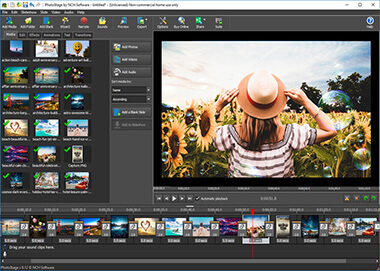
Creating a slideshow from your digital photos has never been easier. Photostage brings your pictures, images and video to life and lets you share your favorite memories with family and friends in an interesting and portable way.

The brief - make a slideshow program so easy to use that your Grandma could do it.
The result - Photostage.

With incredibly powerful features at your fingertips, Photostage lets you set your photos to a soundtrack, record your own narrations and overlay text captions.

PhotoStage is completely free.

Designed to be very easy and intuitive to use, Photostage will have you up and running within minutes. Simply download now and install. We make this software free in the hope you will like it so much you will try our other related software.

Click here to Download Photo Slideshow Software Download Now


Click here for more Screenshots of PhotoStage Slide Show Freeware  

Completely Free Slideshow Creator

  • Full of effects! Includes zoom, crop and fade effects
    Cool panning and zooming effects brings your photos to life.

  • Easy to share! Burn and present on TV, PSP, Mobile Phone and more...
    Burn your slideshow to DVD for playback on TV, or as a standalone video file for enjoying on web and portable devices.

  • Enhance your photos! Easy to use photo enhancements
    Touch up or enhance your photos and videos with ease.

  • Vista compatible! Add up to 1000 photos
    Create up to 1000 photos in a slideshow, and it is fully compatible with Windows® 2000 / XP / Vista™

 
Slideshow Software
 
Introduction
Features
System Requirements
Download
- exe
- zip
Screenshots
Questions (FAQs)
Technical Support
 
 
Related Software
 
Easy Photo Editor
Video Editor
Image File Converter
Audio Recorder
Audio Mixer
Video File Converter
Online Video Downloader
Audio File Converter
Vinyl Record Converter
Sound Editor
CD/DVD Burner
More Software...
 
 
Related Hardware
USB Video Capture
USB PC to TV Device


Slideshow Features

Stunning Transition Effects

  • Panning and zooming effects let you bring your photos to life.
  • Fade transition effect gives your slideshow that professional touch.
  • Preview the effects in real time.
  • Customize the duration of the effect.

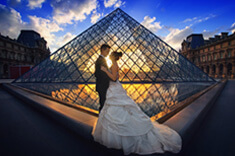
Includes stunning transition effects

Complete Photo Optimization

  • Fine tune brightness, saturation and color for photos and video.
  • Add your favorite photos with a click of a button.
  • Crop, rotate and flip photos easily and preview the changes in real time.
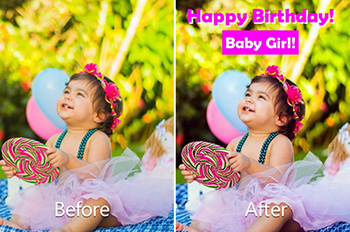
  • Add text captions to individual slides.
  • Add video clips for a complete slideshow presentation.

Optimize your photos and give your slideshow that professional touch

Amazing Audio Tools

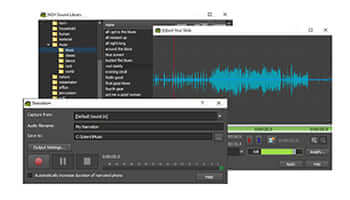
  • Add music tracks to your slideshow.
  • Record narrations with the click of a button.
  • Import pre-recorded narrations
  • Mix multiple music tracks together using our powerful
    MixPad Audio File Mixer

Use the powerful audio tools

Share With Your Family and Friends

  • Burn to DVD and watch in your living room on your TV.
  • Show off your latest pics and clips on PSP, iPod, iPhone, 3GP mobile phone or Pocket PC.
  • Explore the most advanced way to burn HD DVDs and Blu-Ray Discs.
  • Output video files and share your creation with more friends on computer or through Internet.
Watch your slideshow on your TV

Supports Many Media Formats

  • Input Formats:

    • Image: bmp, gif, jpg, jif, jiff, jpeg, exif, png, tif, tiff, psd, tga, pcx, jp2, wmf, ico
    • Audio: wav, mp3, mp2, mpga, m4a, ogg, avi, mid, flac, aac, wma, dct, au, aiff, ogg, raw, msv, dvf, vox, cda, atrac, gsm, dss, sri, shn, dss, msv, wmv and many more.
    • Video: avi, mpeg, wmv, divX, Xvid, mpeg1, mpeg2, mpeg4, mp4, mov, asf, vob, ogm, .3gp, H.264, RM and many more.

  • Output Formats:

    • Disc export: DVD, CD, Blu-ray Discs, HD-DVD
    • Video export: avi, wmv, asf, mpg, 3gp, mp4, mov, iPod, iPhone, PSP, Mobile Phone, Pocket PC

System Requirements
  • Windows 2000/XP/2003/Vista/2008
Download Photostage Slideshow Creator
Once download is complete run the file "pstagesetup.exe" to install Photostage. When the file has installed, please select Help to view (or print) the complete manual.

Click here to download Photostage
More Information...
Related Software
Photostage Slideshow creator is just one component of the NCH Software Suite - Home Edition. If you have not done so already, please see NCH Software page to download many other audio related programs.
Many of these are also free.

 
  © NCH SoftwareTop | Privacy | Legal | Home