NCH Swift Sound
Home | Download | Support | Products | SiteMap  

FlexiServer Management Software

Increase productivity with this employee management software

FlexiServer is software for automatic employee time attendance logging. It also features additional tools for quality assurance monitoring and reporting, and works perfectly with home or remote working staff.

FlexiServer is the modern replacement for an hours book or time card. For staff who work at computers it does all hours logging automatically. It records log on and shut down times as worked hours. It automatically detects lunch and other long breaks by monitoring computer idle state. Hours can also be entered manually if the employee is not working at a computer.

The way it works is like this. The manager or bookkeeper runs FlexiServer on their Windows or Linux PC. Whenever the manager or bookkeeper want to view reports they can log onto FlexiServer with their web browser and use the control panel.

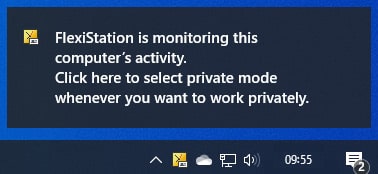
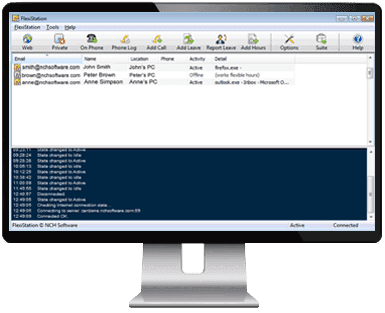
All staff then run the component FlexiStation on their computers (Windows, Mac OS X or Linux). As a restricted version of FlexiServer and providing only the essential features, FlexiStation will run automatically in the background logging hours worked. Employees can also add hours manually, report a colleague sick or put in an application for annual leave.

Designed to be very easy and intuitive to use, FlexiServer will have you up and running within minutes. Simply download now and install. That version is free for up to 4 employees. For more than 4 employees you can buy a corporate license.

Purchase

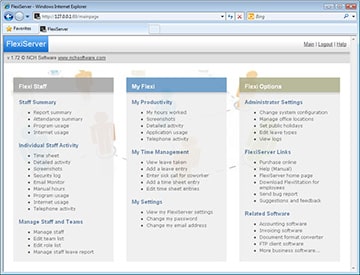
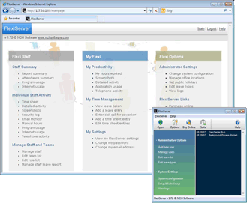
Click here to see what FlexiServer looks like
Benefits
  • Saves employees the chore of needing to fill out hours in their hours books every day.
  • No more chasing staff for them to submit their hours. Bookkeeping has 24/7 immediate access to casual staff hours.
  • Improves the way your business works by knowing exactly what is taking your staff the most time. Reports can be used for costing reasons to estimate how much time employees are working in different programs.
  • Gives management the confidence to let employees work at home without fearing not being able to see what they are working on. The QA Screen Monitor gives managers the chance to see what their team is working on at any time just as if they were in the office.
  • Lets you know exactly where your colleagues are at any time. This is perfect in roaming computer environments where it will show you which computer any member of your team is working at.
  • Allows management to monitor outsourced or contract staff and whether they are working and the hours they are billing for.
  • Gives employees more flexibility. With the FlexiServer accurate hours tracking implemented, management are much more likely to let employees work when they want.


FlexiServer
Introduction
Features
System Requirements
Download
- for Windows
- for Mac (FlexiStation)
- for Linux
Pricing & Purchase
Screenshots
Questions (FAQs)
Technical Support
 
 
Related Software
Screen Sharing
Invoicing Software
Archive Emails
Call Conferencing
Corporate Dictation
Backup Software
VoIP Telephone System
Call Recording
Video Security
More Software...
 
Features
  • Logs employee time attendance automatically using computer logon times.
  • Hours can automatically be entered on a web form either as an alternative to computer logging or to override computer detect times.
  • Automatically detects breaks using a configurable idle time measure.
  • Can be linked to payroll software. Files are stored in open database friendly format.
  • Shows the team if anyone is in the office (or working at home), what computer they are working at and (optionally) what document they are working on.
  • Real time screen monitoring of home employees (optional).
  • Can run on any Windows computer (XP or later). It does not need a dedicated server. It is typically run on the managers or bookkeepers computer.
  • FlexiStation keeps logging hours even if the server computer is turned off. When it is turned on all cached data is sent.
  • Works behind firewalls routers and other difficult networks.
  • Can be used over the internet (for remote workers) or on the local network (for in-office staff).
  • Very easy to use. No special technical knowledge is needed.
  • Can run up to 300 employees from one installation.
  • While FlexiServer can be installed on Windows or Linux PCs, employees can be running the FlexiStation module on Windows, Mac OS X or Linux.
  • Installs literally in 2 minutes. Just click download then enter your name and the list of employees.
System Requirements
For the Main Computer (FlexiServer):   For the Employees Computers (FlexiStation):
  • Windows XP/2003/Vista or later
  • Linux
  • Windows 2000/XP/2003/Vista or later
  • Mac OS X 10.2 or later
  • Linux
Download Flexi-Hours Time Management Software
This software can be downloaded by clicking on one of the following links: Once download is complete run the file "fsrvsetup.exe" to install. When the file has installed, please select Help to view (or print) the complete manual.

More Information...
  Click here for more Screenshots

See More Screenshots >>>

  © NCH SoftwareTop | Home