- Easily organize and keep track of inventory
- Never run out of stock with warnings and reports
- Cloud access feature lets staff access remotely
- Installs and is running in just minutes
Inventoria is designed to be as intuitive to use as possible, so after a quick installation, you’ll be streamlining your inventory processes within minutes.
Inventoria is ready to use immediately after installation, with no steep learning curve or training period. You’re just minutes away from optimizing your inventory processes.
System Requirements
- Windows XP/Vista, Windows 7 and 8
- Works on 64 bit Windows
- For earlier versions see Win 98 and Win 2000
- Mac OS X 10.3 or above
Download Inventoria Stock Inventory Software
|
Inventory Control Features
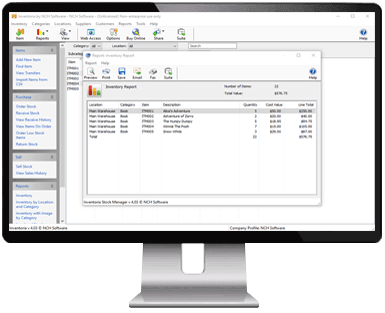
- Monitor and report stock levels, costs and averages
- Scan in barcodes to add new items
- Import current inventory with a .csv file
- Add notes, URLs and photos to item descriptions
- Set sales units for items sold by weight or in bundles
- Group items into categories for organized stock control
- Set low-level warnings so you know when to reorder
- View overall inventory levels, or by location and category
- See product history of when items were received or sold
- Transfer stock between locations
- Maintain a database of your customers and suppliers
- Create purchase orders and email directly to vendors
- Mobile access to the program through the web interface
(e.g., iPhone, Android)
- Web access lets multiple users within the organization use Inventoria data and features
- Assign appropriate access levels to different users
- Manage multiple businesses simultaneously
- Simple, easy to use interface
Ordering and Receiving
- Create purchase orders and email directly to vendors
- Maintain a database of customers and suppliers
- Set low-level warnings so you know when to reorder
- Update item quantities when orders are received
Inventory Reporting
- Monitor and report stock levels, costs and averages
- View overall inventory levels, or by location and category
- See product history of when items were received or sold
Item Control
- Import current inventory with a .csv file
- Scan in barcodes to add new items
- Add notes, URLs and photos to item descriptions
- Group items into categories for organized stock control
- Set sales units for items sold by weight or in bundles
Manage Users and Locations
- Transfer stock between locations
- Web access allows users in different locations to log in
- Assign appropriate access levels to different users
- Mobile access to the program through the web interface
(e.g., iPhone, Android)
- Manage multiple businesses simultaneously
|
|